Before going through this post you might like to read my previous post, to understand the general things.
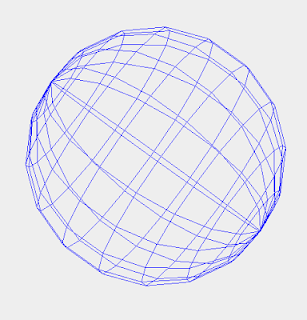
Last time, I have discussed about some of the general theory needed to draw a three dimensional Sphere on the computer screen. Today, I am going to demonstrate the actual drawing of the sphere on the screen. The complete working code to draw the sphere will be provided in this post.
For working with Three D graphics, You need a good grasp of two main concepts:
Then on top of the RPoint, You could generate another object with the properties of a sphere. Sphere has a center, radius, and lots of points through its surface. It can rotate, translate etc.
Last time, I have discussed about some of the general theory needed to draw a three dimensional Sphere on the computer screen. Today, I am going to demonstrate the actual drawing of the sphere on the screen. The complete working code to draw the sphere will be provided in this post.

For working with Three D graphics, You need a good grasp of two main concepts:
- Point and its operations ( translations)
- Concept of projections in space geometry
/**
 *
 * @author Rajan Prasad Upadhyay
 * class RPoint.java
 */
public class RPoint {
    public double x;
    public double y;
    public double z;
    public RPoint(){}
    public RPoint(double x,double y,double z){
        this.x=x;
        this.y=y;
        this.z=z;
    }
    public void viewPoint(){
        System.out.println("("+x+","+y+","+z+")");
    }
    public int getX(){
        int i=(int)Math.rint(x);
        return i;
    }
    public int getY(){
        int i=(int)Math.rint(y);
        return i;
    }
    public int getZ(){
        int i=(int)Math.rint(z);
        return i;
    }

    public RPoint getRotateAlongTheta(int radius,double theta,RPoint center){
        double tx=x-center.x,ty=y-center.y,tz=z-center.z;
        double tx1,ty1,tz1;
         tx1=tx*Math.cos(Math.toRadians(theta))-tz*Math.sin(Math.toRadians(theta));
         tz1=tx*Math.sin(Math.toRadians(theta))+tz*Math.cos(Math.toRadians(theta));
         tx=tx1+center.x;
         tz=tz1+center.z;
        RPoint p=new RPoint(tx,y,tz);
        return p;
    }
    public RPoint getRotateAlongPhi(int radius,double phi, RPoint center){
        double tx=x-center.x,ty=y-center.y,tz=z-center.z;
        double tx1,ty1,tz1;
         tx1=tx*Math.cos(Math.toRadians(phi))-tz*Math.sin(Math.toRadians(phi));
         ty1=tx*Math.sin(Math.toRadians(phi))+tz*Math.cos(Math.toRadians(phi));
         tx=tx1+center.x;
         ty=ty1+center.y;
        RPoint p=new RPoint(tx,ty,z);
        return p;
    }
    //unit vectors
    public double getL(){
        double a=x/Math.sqrt(x*x+y*y+z*z);
        return a;
    }
    public double getM(){
        double a=y/Math.sqrt(x*x+y*y+z*z);
        return a;
    }
    public double getN(){
        double a=z/Math.sqrt(x*x+y*y+z*z);
        return a;
    }

    //project coordiantes functions
    public int getViewX(int cz){
        int a=(int)Math.rint(cz*x/z);
        return a;
    }
    public int getViewY(int cz){
        int a=(int)Math.rint((cz)*y/z);
        return a;
    }
    public int getViewZ(int cz){
        int a=(cz);
        return a;
    }
    //3d translations functions
    public RPoint translate( RPoint p){
        RPoint a=new RPoint(x-p.x,y=p.y,z-p.z);
        return a;
    }
    public RPoint inverseTranslate( RPoint p){
        RPoint a=new RPoint(x+p.x,y+p.y,z+p.z);
        return a;
    }
    public void RotateAlongTheta( double theta, RPoint center){
        double tx=(x-center.x)*Math.cos(Math.toRadians(theta))-(z-center.z)*Math.sin(Math.toRadians(theta));
        double tz=(x-center.x)*Math.sin(Math.toRadians(theta))+(z-center.z)*Math.cos(Math.toRadians(theta));
        x=tx+center.x;
        z=tz+center.z;
    }
    public void RotateAlongPhi( double phi, RPoint center){
        double tz=(z-center.z)*Math.cos(Math.toRadians(-phi))-(y-center.y)*Math.sin(Math.toRadians(-phi));
        double ty=(z-center.z)*Math.sin(Math.toRadians(-phi))+(y-center.y)*Math.cos(Math.toRadians(-phi));
        y=ty+center.y;
        z=tz+center.z;
    }

    public RPoint RotateAlongX(int theta, RPoint center){
        //x does not change
        double tz=(z-center.z)*Math.cos(Math.toRadians(-theta))-(y-center.y)*Math.sin(Math.toRadians(-theta));
         double ty=(z-center.z)*Math.sin(Math.toRadians(-theta))+(y-center.y)*Math.cos(Math.toRadians(-theta));
         return new RPoint(x,ty+center.y,tz+center.z);
    }
    public RPoint RotateAlongY( int theta, RPoint center){
        //ie rotating along y axix , clockwise
        double tx=(x-center.x)*Math.cos(Math.toRadians(theta))-(z-center.z)*Math.sin(Math.toRadians(theta));
        double tz=(x-center.x)*Math.sin(Math.toRadians(theta))+(z-center.z)*Math.cos(Math.toRadians(theta));
        return new RPoint(tx+center.x,y,tz+center.z);
    }
    public RPoint RotateAlongZ(int theta, RPoint center){
        //z constant
        double tx=(x-center.x)*Math.cos(Math.toRadians(theta))-(y-center.y)*Math.sin(Math.toRadians(theta));
        double ty=(x-center.x)*Math.sin(Math.toRadians(theta))+(y-center.y)*Math.cos(Math.toRadians(theta));
        return new RPoint(tx+center.x,ty+center.y,z);
    }

    //prospective view coordinate giving functions
    public void RevolveAlongY(double theta, RPoint sample){
        double tx=(x-sample.x)*Math.cos(Math.toRadians(theta))-(z-sample.z)*Math.sin(Math.toRadians(theta));
        double tz=(x-sample.x)*Math.sin(Math.toRadians(theta))+(z-sample.z)*Math.cos(Math.toRadians(theta));
        x=tx+sample.x;
        z=tz+sample.z;
    }
    public void RevolveAlongX(double theta, RPoint sample){

    }
    public RPoint getPerspective( RPoint viewPoint){
        double xp=x-(-z)/(viewPoint.z-z)*(x-viewPoint.x);
        double yp=y-(-z)/(viewPoint.z-z)*(y-viewPoint.y);
        double zp=0;
        return new RPoint(xp,yp,zp);
    }
    public RPoint rotateAlongY(double angle){
        double x2=x*Math.cos(Math.toRadians(angle))-z*Math.sin(Math.toRadians(angle));
        double y2=x*Math.sin(Math.toRadians(angle))+z*Math.cos(Math.toRadians(angle));
        return new RPoint(x2,y2,z);
    }
}
Then on top of the RPoint, You could generate another object with the properties of a sphere. Sphere has a center, radius, and lots of points through its surface. It can rotate, translate etc.
/**
 *
 * @author Rajan Prasad Upadhyay
 * class RSphere.java
 */

import java.awt.Color;
import java.awt.Graphics;

public class RSphere {
    RPoint center;
    RPoint viewPoint=new RPoint(600,400,2000);
    int radius;
    public Graphics g;
    int delphi;//used to determine the number of rows in mat[][] ie point matrix
    int deltheta;//determine the num of cols in the mat
    int numOfRows;
    int numOfCols;
    RPoint mat[][];//matrix of points// actual world coordinates
    RPoint mat1[][];//to hold projected coordinates
    RPoint mat2[][];//matrix according to view points angle with the z axis;;

    int angle=0;

    public RSphere(){
        center=new RPoint(0,0,0);
        radius=50;
        deltheta=20;
        delphi=20;
        numOfRows=180/delphi;
        numOfCols=360/deltheta;
    }
    public void setGraphics(Graphics gh){
        if(gh != null){
            this.g = gh;
        }else{
            System.out.println("Your graphics context is null.");
        }
    }

    public void setColor(Color c){
        g.setColor(c);
    }

    public void set_Center( RPoint p){
        //this funciton should be called at the beginning only
        center=p;
    }
    public void set_viewer(int x,int y,int z){
        viewPoint=new RPoint(x,y,z);
    }
    public void set_Center(int x,int y,int z){
        center=new RPoint(x,y,z);
    }
    public void setRadius(int r){
        radius=r;
    }
    public void initialize(){
        numOfRows = 180/delphi+1;
        numOfCols = 360/deltheta+1;
        mat = new RPoint[numOfRows][numOfCols];
        mat1 = new RPoint[numOfRows][numOfCols];
        mat2 = new RPoint[numOfRows][numOfCols];
        System.out.print("center=");
        center.viewPoint();
        System.out.println("radius="+this.radius);
        double theta = 0;
        double phi = 90;
        for(int row = 0; row<numOfRows; row++){
            for(int col = 0;col < numOfCols; col++){
                //creating the matrix
                mat[row][col] = new RPoint(
                        center.x+radius*Math.cos(Math.toRadians(theta))*Math.cos(Math.toRadians(phi))
                        ,center.y+radius*Math.sin(Math.toRadians(phi))
                        ,center.z+radius*Math.sin(Math.toRadians(theta))*Math.cos(Math.toRadians(phi))
                  );
                mat1[row][col] = mat[row][col].getPerspective(viewPoint);
                theta += deltheta;
                theta %= 360;
            }
            phi -= delphi;
            theta = 0;
        }
    }//initialize

    public void drawLatitudes(){
        int cz = -20;
        for(int i=0;i<numOfRows;i++){
            for(int j=0;j<(numOfCols-1);j++){
                g.drawLine(mat[i][j].getX(), mat[i][j].getY(), mat[i][j+1].getX(), mat[i][j+1].getY());
            }
        }
    }
    public void drawLongitudes(){
        int cz=0;
        for(int i=0;i<numOfRows-1;i++){
            for(int j=0;j<numOfCols;j++){
                g.drawLine(mat[i][j].getX(), mat[i][j].getY(), mat[i+1][j].getX(), mat[i+1][j].getY());
            }
        }
    }

    public void rotateAlongX(int angle){
        for(int i=0;i<numOfRows;i++){
            for(int j=0;j<numOfCols;j++){
               mat[i][j]=mat[i][j].RotateAlongX(angle,center);//perfect
            }
        }
    }
    public void rotateAlongY(int angle){
        for(int i=0;i<numOfRows;i++){
            for(int j=0;j<numOfCols;j++){
              mat[i][j]= mat[i][j].RotateAlongY(angle,center);//perfect
            }
        }
    }
    public void rotateAlongZ(int angle){
        for(int i=0;i<numOfRows;i++){
            for(int j=0;j<numOfCols;j++){
               mat[i][j]=mat[i][j].RotateAlongZ(angle,center);//perfect
            }
        }
    }

    public void updatePerspective(){
        for(int i=0;i<numOfRows;i++){
            for(int j=0;j<numOfCols;j++){
                mat1[i][j]=mat[i][j].getPerspective(viewPoint);
            }
        }
    }
    public void calculatePrespective(){
        for(int i=0;i<numOfRows;i++){
            for(int j=0;j<numOfCols;j++){
                mat1[i][j]=mat[i][j].getPerspective(viewPoint);
            }
        }
    }
    public void prospectiveView(){
        calculatePrespective();
       viewTheLines(mat1);
    }
    public void viewTheLines( RPoint mat1[][]){
         //longitute
        for(int i=0;i<numOfRows-1;i++){
            for(int j=0;j<numOfCols;j++){
                g.drawLine(mat1[i][j].getX(), mat1[i][j].getY(), mat1[i+1][j].getX(), mat1[i+1][j].getY());
            }
        }
        //latitude
        for(int i=0;i<numOfRows;i++){
            for(int j=0;j<(numOfCols-1);j++){
                g.drawLine(mat1[i][j].getX(), mat1[i][j].getY(), mat1[i][j+1].getX(), mat1[i][j+1].getY());
            }
        }
    }

}
and finally to display the frame we have
/**
 *
 * @author Rajan Prasad Upadhyay
 * class RFrame.java
 */
import java.awt.Color;
import java.awt.Dimension;
import java.awt.Graphics;
import java.awt.event.KeyEvent;
import javax.swing.JFrame;


public class RFrame extends JFrame{
    RSphere earth = new RSphere();
    RPoint earthCenter=new RPoint(600,400,-1500);
    int viewAngle = 0;
    Graphics g;

    private void arrangeGraphics(){
        earth.set_Center(earthCenter);
        earth.setRadius(200);

        earth.initialize();
        g = this.getGraphics();
        if(g != null){
            earth.setGraphics(g);
        }else{
            System.out.println("The g is null, Frame.java");
        }
        if(earth.g != null){
            earth.setColor(Color.blue);
        }else{
            System.out.println("Graphics is null");
        }
    }
    public RFrame(){
        initComponents();

        arrangeGraphics();
        earth.drawLatitudes();
        earth.drawLongitudes();
    }

    private void initComponents(){
        setDefaultCloseOperation(javax.swing.WindowConstants.EXIT_ON_CLOSE);
        this.setMinimumSize(new Dimension(1000,800));
        addKeyListener(new java.awt.event.KeyAdapter() {
            public void keyPressed(java.awt.event.KeyEvent evt) {
                formKeyPressed(evt);
            }
        });
        javax.swing.GroupLayout layout = new javax.swing.GroupLayout(getContentPane());
        getContentPane().setLayout(layout);
        layout.setHorizontalGroup(
            layout.createParallelGroup(javax.swing.GroupLayout.Alignment.LEADING)
            .addGap(0, 483, Short.MAX_VALUE)
        );
        layout.setVerticalGroup(
            layout.createParallelGroup(javax.swing.GroupLayout.Alignment.LEADING)
            .addGap(0, 320, Short.MAX_VALUE)
        );

        pack();
    }
    private void formKeyPressed(java.awt.event.KeyEvent evt){
        RPoint p = earth.center;
        if(evt.getKeyCode()==KeyEvent.VK_LEFT){
            g.clearRect(0, 20, this.getWidth(), this.getHeight());
            earth.rotateAlongZ(5);
            earth.drawLatitudes();
            earth.drawLongitudes();
        }if(evt.getKeyCode()==KeyEvent.VK_SPACE){
            g.clearRect(0, 20, this.getWidth(), this.getHeight());
            earth.rotateAlongY(1);
            earth.drawLatitudes();
            earth.drawLongitudes();
        }
    }

    @Override
    public void paint(Graphics g){
        earth.drawLatitudes();
        earth.drawLongitudes();
    }

    public static void main(String [] args){
        RFrame f = new RFrame();
        f.setVisible(true);
    }
}
Now try running the code and press the Space and Left arrow button on the key-board. Have fun.
